Save your thoughts
when you browse the web
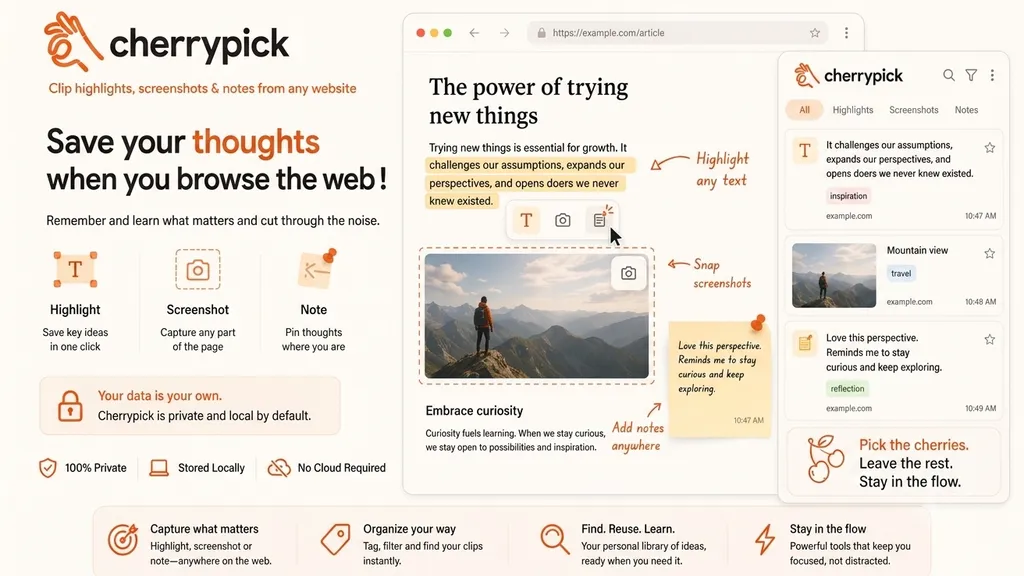
cherrypick lets you clip highlights, snap screenshots and pin notes from any website — so you remember and learn what matters, and cut through the noise.
What you can do
Capture what matters, anywhere on the web
Three ways to clip the good stuff — one click each, right where you are.
Highlight
Save key ideas in one click. Highlight any text on any page and keep it forever.
Screenshot
Capture any part of the page. Snap a chart, a quote or a whole section in seconds.
Note
Pin thoughts where you are. Add notes anywhere and keep your reflections with the source.
How it works
From fleeting ideas to a thought library
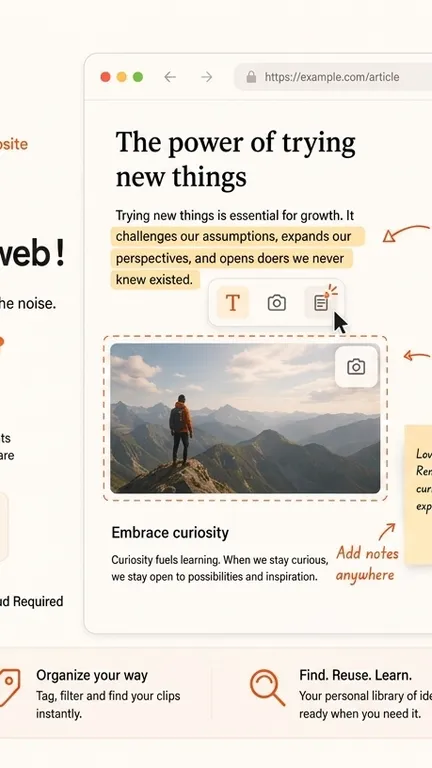
Highlight any text
Select a passage and click — the highlight is saved instantly, no account needed.
Snap a screenshot
Drag to capture any part of the page when words alone won’t do.
Add a note
Pin a thought right where it struck you, tagged and tied to the original page.
Find, reuse, learn
Everything lands in one searchable, taggable library — ready when you need it.
Why cherrypick
Built to keep you in the flow
Tools that help you focus, not distract you.
Highlight, screenshot or note — anywhere on the web.
Tag, filter and find your clips instantly.
Your personal library of ideas, ready when you need it.
Powerful tools that keep you focused, not distracted.
FAQ
Frequently asked questions
Everything you need to know before you start picking.
Is cherrypick really free?
Yes. Install it, highlight, screenshot and note as much as you like — no account required.
Where is my data stored?
Everything is stored locally in your browser by default. cherrypick works offline and never sends your clips to a server.
Which browsers are supported?
cherrypick runs on Chrome, Edge and other Chromium browsers, with Firefox support on the way.
Do I need to create an account?
No. There is no sign-up and no login — just add it to your browser and start clipping.
Can I find my clips again later?
Yes. Every highlight, screenshot and note lands in one searchable, taggable library, tied back to its original page.
Does it slow down my browsing?
No. cherrypick is lightweight and stays out of the way until you reach for it.
Pick what matters
Remember and learn what matters as you browse. Stay in the flow with cherrypick — private, local, and free.